
Psiphon
Screenshots



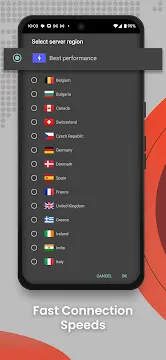

Psiphon is a specialized censorship-circumvention tool designed to provide open access to the internet. It uses advanced VPN, SSH, and HTTP Proxy technologies to bypass content filters and geo-blocks. The software acts as a secure tunnel between your mobile hardware and a global network of proxy servers. This design ensures that you can browse news websites, social networks, and streaming platforms without restrictions. Because many networks monitor user activity, this utility focuses heavily on stealth and adaptation. It changes its transmission patterns automatically when it detects interference from network administrators. It essentially creates a bridge to the global internet, offering a private connection wherever you go.
How the Psiphon Network Bypasses Digital Censorship
The technology behind Psiphon relies on a massive, decentralized infrastructure of thousands of proxy servers worldwide. When you click the connect button, the software analyzes your local network conditions immediately. It tests various obfuscation protocols to determine the most effective way to disguise your data traffic.
If a network firewall blocks standard VPN traffic, the app switches to an encrypted SSH tunnel. It can also mask your data inside ordinary HTTP requests, making your internet footprint look completely normal to trackers. This constant adaptation prevents local systems from blocking the connection entirely. The system learns from network disruptions in real-time, ensuring that users maintain stable connectivity even during heavy regional firewalls.
Why Use Psiphon for Secure and Private Browsing
Using Psiphon provides a major layer of security when connecting to public networks. Open Wi-Fi connections at coffee shops, airports, and hotels often lack basic encryption. This vulnerability allows malicious actors to monitor your browsing habits or steal personal credentials.
The software resolves this issue by encrypting all data leaving your device. It hides your destination IP address and scrambles the contents of your web requests. This means your internet service provider or network operator can only see that you are connected to the proxy network. They cannot see which websites you visit or what data you transfer. This high level of privacy makes the tool indispensable for travelers and remote workers who rely on unverified public hotspots.
Key Features for a Better Connection Session
The application dashboard focuses on utility and simplicity rather than complex configurations. It gives users immediate access to advanced networking features without a steep learning curve. Here are the most prominent features built into the software:
- Global Server Selection: Choose from multiple countries to mask your location and access region-specific content.
- Whole-Device Tunneling: Route the data of every installed app through the secure network automatically.
- App-Specific Exclusion: Select specific apps to bypass the proxy tunnel if you want them to use your local network speed.
- Integrated Web Browser: Use the lightweight, built-in browser for instant, private web surfing without leaving the utility.
- Real-Time Statistics: Track your data usage, connection speed, and uptime directly from the main statistics menu.
- Automatic Reconnect: The app automatically finds a new proxy server if your current connection drops.
How to Optimize Performance in Psiphon for Faster Speeds
Achieving optimal speeds inside Psiphon requires understanding how proxy networks distribute workloads. Because data encryption adds processing steps, you might notice a slight drop in your baseline internet speed. To minimize this effect, you should always select the “Best Performance” server option. This setting instructs the app to connect to the geographically closest server with the lowest current traffic load.
Additionally, you can toggle the “Tunnel Whole Device” setting based on your current task. If you only need to bypass a restriction on a specific web browser, you can configure the app to run in proxy-only mode. This adjustment reduces the processing strain on your mobile hardware, leading to quicker page load times and less battery drain. Regularly clearing the application cache inside your device settings also helps maintain peak scrolling efficiency.
Managing Your Connection Settings and Diagnostics
The settings panel allows you to customize your network behavior down to the specific port configuration. You can enter custom HTTP headers if your local network requires special authentication. This capability is highly beneficial for users trying to connect through restrictive corporate or school networks.
The application also includes a dedicated diagnostic log that records connection events step-by-step. If you encounter a connection failure, you can inspect this text log to find the exact error code. This data helps you understand whether the issue stems from a local network dropout or a server-side restriction. The interface presents these technical logs clearly, allowing you to troubleshoot and modify your proxy configurations on the fly.
The Technological Future of Secure Internet Routing
The evolution of secure routing utilities points toward increasingly sophisticated data obfuscation. As monitoring systems grow more complex, developers must constantly update their code to stay ahead of deep packet inspection tools. This software adapts by integrating newer, lighter encryption standards that provide the same security with less processing lag.
The community supporting this project frequently updates the global server list to replace blocked IP addresses. This constant cycle of updates ensures that the tool remains reliable over the long term. It highlights a massive push toward making privacy tools more efficient and accessible, ensuring that everyone can experience a truly open web environment.
Conclusion
Psiphon offers a powerful and reliable solution for individuals seeking unrestricted internet access. By combining multiple protocol options with a massive global server network, it effectively neutralizes aggressive content filters and regional blocks. The application provides essential data encryption, making your public Wi-Fi sessions significantly more secure. With features like app exclusion and real-time statistics, it satisfies both casual users who want quick access and advanced users who need deep configuration tools. Optimizing your server location and monitoring your diagnostic logs ensures a highly responsive and fluid web experience. It represents a vital tool for reclaiming your digital freedom and keeping your personal data secure on the move.